Day 22: Docker - Demystifying Architecture
Experienced Senior DevOps Engineer with a passion for optimizing software development and delivery processes. Excels in designing and implementing CI/CD pipelines, automating infrastructure, and optimizing cloud architectures. Proficient in a wide range of DevOps tools such as Docker, Kubernetes, Jenkins, Ansible, Git, and AWS services. Strong collaborator, adept at fostering cross-functional teamwork and continuous improvement. Thrives in dynamic environments, utilizing problem-solving skills to overcome complex challenges. Dedicated to delivering high-quality software products on time and within budget.
Docker has indeed become an integral part of DevOps, revolutionizing the way developers build, ship, and run applications across diverse environments. Behind this incredible tool lies a sophisticated architecture that drives its containerization capabilities. In this blog, I will cover everything you need to know about the Docker architecture. Here are the key points I will be discussing:
Traditional Virtualization Vs Docker
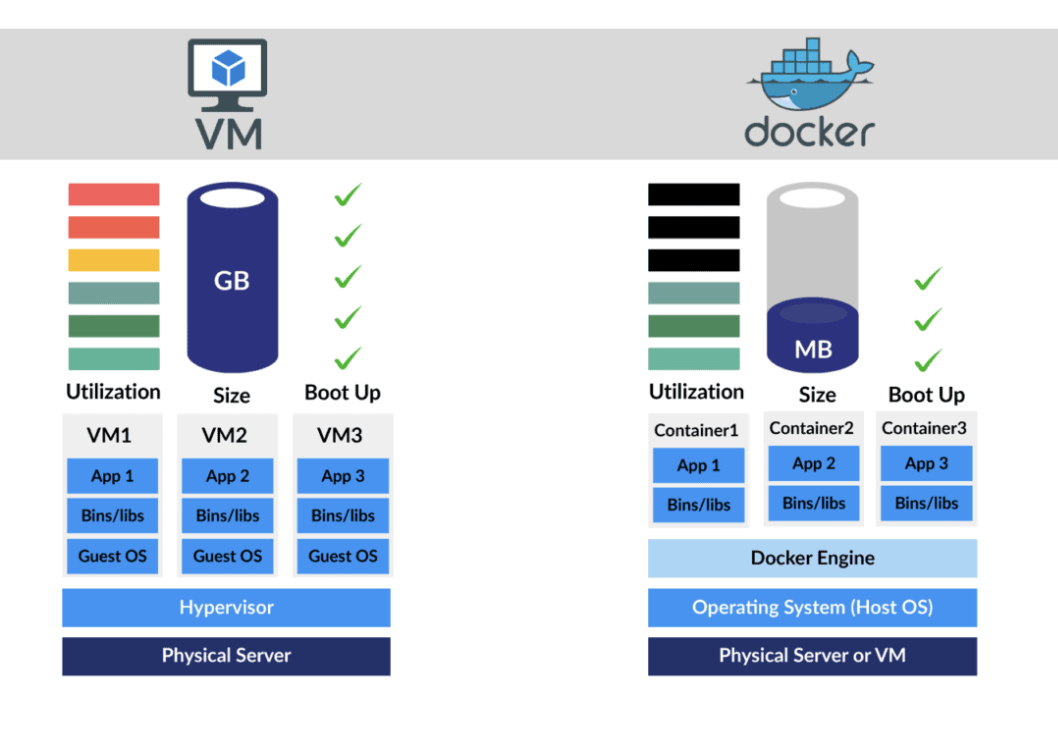
Traditional virtualization and Docker are two different approaches to achieving virtualization in the context of running applications and services on a computer system. While both aim to provide isolation and portability, they have different architectures and use cases. Here's a brief comparison of traditional virtualization and Docker
Architecture:
Traditional Virtualization: In traditional virtualization, a hypervisor (such as VMware or Hyper-V) is used to create multiple virtual machines (VMs) on top of a physical server. Each VM includes its operating system (OS) and runs on top of the hypervisor.
Docker: Docker uses containerization technology, where containers are created to run applications. Containers share the host system's kernel but are isolated at the user-space level, meaning they share the OS but not the OS components.
Resource Overhead:
Traditional Virtualization: VMs require a full guest OS, which leads to a higher resource overhead. Each VM needs its allocated RAM, storage, and CPU resources.
Docker: Containers are more lightweight as they share the host OS kernel and libraries, reducing resource overhead significantly. They use fewer resources compared to VMs.
Isolation:
Traditional Virtualization: VMs provide strong isolation since each VM runs on its separate kernel and OS, resulting in better security.
Docker: Containers provide isolation at the user-space level, which is generally sufficient for most use cases. However, they may not offer the same level of isolation as VMs, which could be a consideration for certain high-security scenarios.
Deployment and Portability:
Traditional Virtualization: VMs are typically larger and can take longer to deploy due to the need to create and configure a full OS for each VM.
Docker: Containers are smaller in size and can be deployed much faster, as they package only the application and its dependencies, making them highly portable across different environments.
Use Cases:
Traditional Virtualization: Traditional virtualization is well-suited for scenarios where you need to run multiple different operating systems on the same hardware or when strong isolation is required, such as running legacy applications or hosting multiple unrelated services.
Docker: Docker is widely used for modern application development and deployment. It is particularly useful for microservices architectures, continuous integration/continuous deployment (CI/CD) workflows, and cloud-native applications.
Management:
Traditional Virtualization: Managing VMs often involves more complex processes, such as managing individual OS instances and patching them separately.
Docker: Docker provides simpler management and orchestration tools, making it easier to manage containers at scale and automate deployment processes.
DOCKER
Docker is a popular platform that allows developers to build, deploy, and run applications inside containers. Containers are lightweight, portable, and isolated environments that package an application and its dependencies, ensuring consistency across different environments. Docker has become a cornerstone of modern software development and offers several advantages and disadvantages.
Advantages of Docker
Portability: Docker containers can run on any platform that supports Docker, making it easy to move applications across different environments, from development to testing and production.
Isolation: Containers provide process-level isolation, ensuring that applications run independently of the underlying infrastructure and do not interfere with each other.
Resource Efficiency: Containers share the host OS kernel, which results in lower resource overhead compared to traditional virtualization solutions. This allows for higher density and better utilization of resources.
Rapid Deployment: Docker's containerization approach allows for quick and automated deployment of applications, reducing deployment time significantly.
Version Control: Docker enables versioning of container images, allowing you to roll back or update to specific versions easily.
Ecosystem: Docker has a vast ecosystem with thousands of pre-built, community-maintained images available on Docker Hub, making it easy to use and integrate with various technologies.
Continuous Integration and Deployment (CI/CD): Docker simplifies the CI/CD process, making it easier to integrate containers into the development workflow.
Disadvantages of Docker
Learning Curve: Docker introduces new concepts and commands, which might require some learning and adaptation for developers who are new to containerization.
Security Concerns: While Docker provides isolation, misconfigurations or vulnerabilities in containers can still pose security risks. Proper security measures need to be implemented to ensure container security.
Resource Sharing: Containers share the host OS kernel, which means a vulnerability in the kernel could potentially impact all containers running on the host.
Overhead: Although Docker containers are lightweight compared to virtual machines, there is still some overhead associated with running multiple containers on a single host.
Persistence: Containers are designed to be ephemeral, which means they are generally stateless. Handling persistent data and database-related tasks can be more complex.
Components in Docker
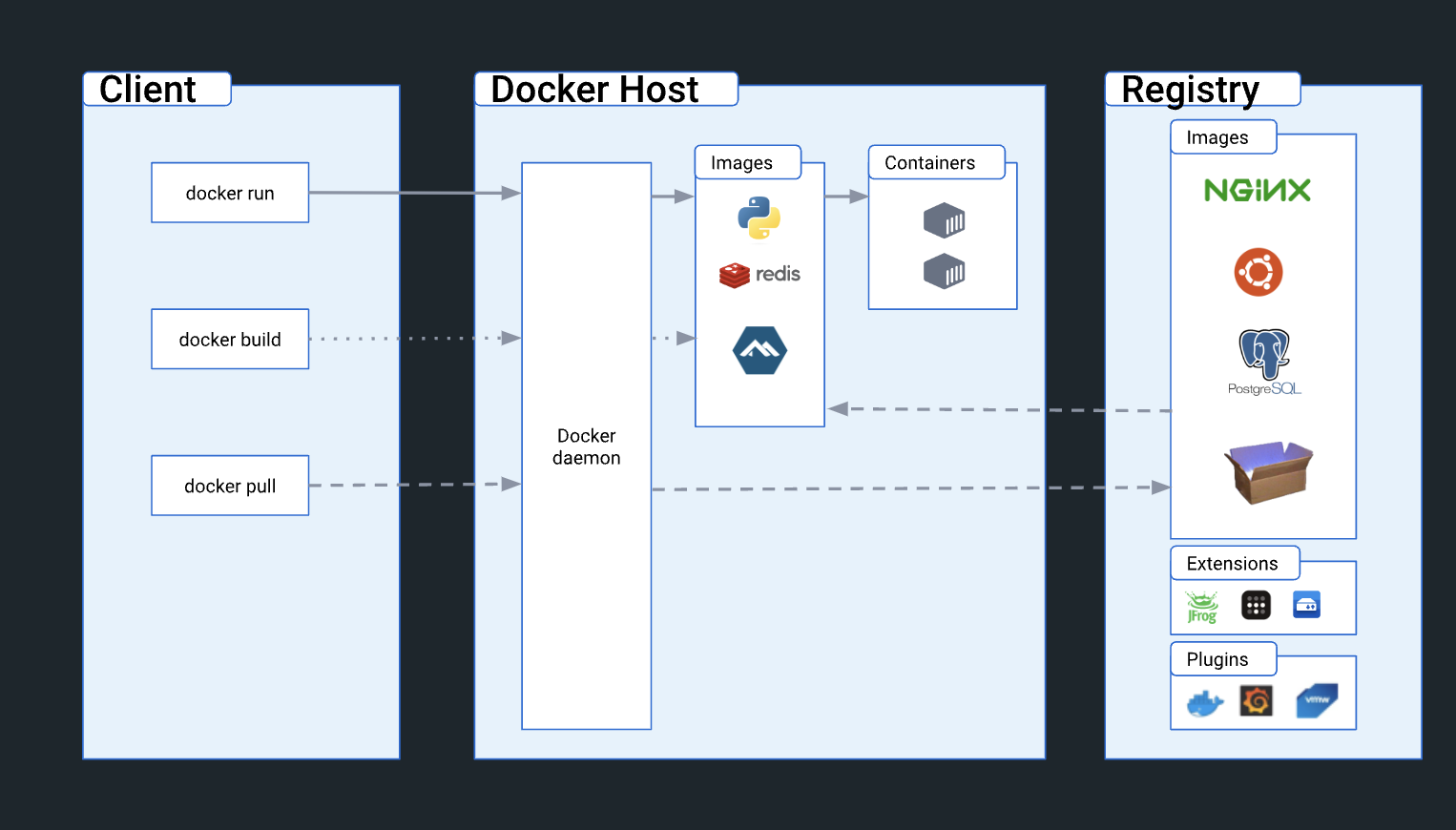
In Docker, several components work together to create, manage, and run containers. Here is a list of the main components:
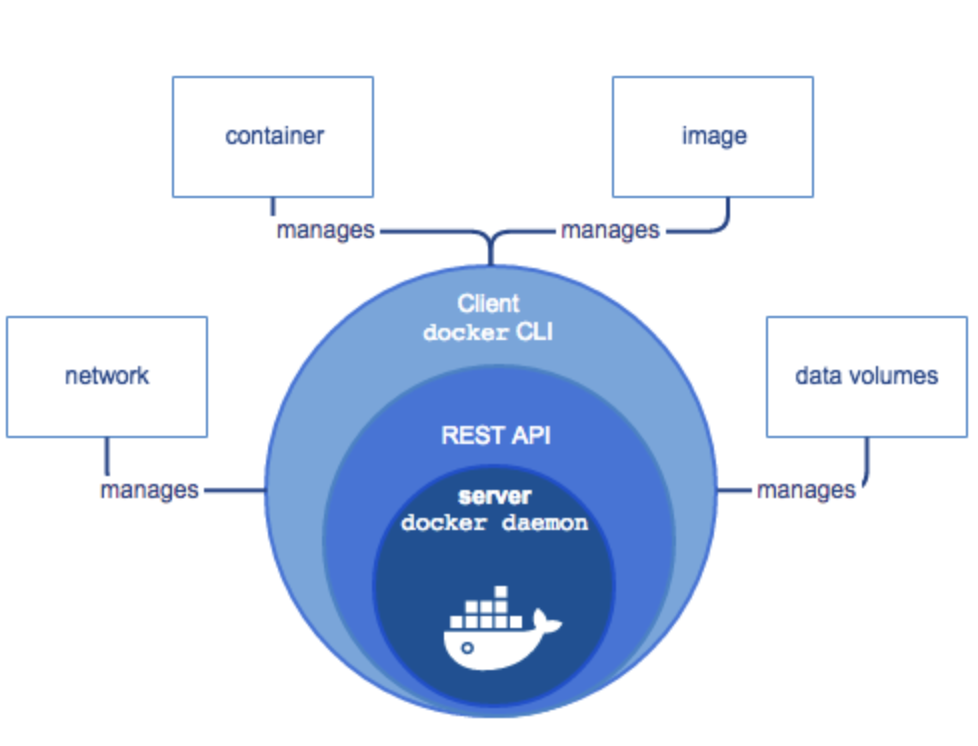
Docker Engine: The core component responsible for running and managing Docker containers on the host system. It consists of three main parts:
Docker Daemon: The background service that manages and executes container-related tasks.
Docker REST API: The interface that allows users to interact with the Docker Daemon and perform various container operations.
Docker CLI: The command-line tool used to interact with the Docker Engine and manage containers and images.
Docker Images: Immutable, lightweight templates used to create containers. Images contain the application code, libraries, dependencies, and other files needed to run the application. Images are built from a Dockerfile.
Docker Containers: Runnable instances of Docker images. Containers are isolated from each other and the host system, ensuring the application runs consistently across different environments.
IMPORTANT NOTE:
When an image is running we can say container, when we send a container or not-runnable state we can say Image.Dockerfile: A simple text file that contains instructions to build a Docker image. It defines what goes into the image and how the application should be configured.
Docker Compose: A tool for defining and running multi-container Docker applications using a YAML file to specify the configuration. It allows you to define the services, networks, and volumes required for an application.
Docker Registry: A storage system for Docker images. Docker Hub is the default public registry provided by Docker, but private registries can also be set up for secure image storage and sharing within organizations.
Docker Hub: A cloud-based registry service provided by Docker, allowing users to share and access pre-built container images. It serves as a centralized repository for public Docker images.
Docker Volume: A mechanism for persisting data generated by and used by Docker containers. Volumes provide a way to share data between containers and store data beyond the lifecycle of a container.
Docker Network: A virtual network that enables communication between containers running on the same host or different hosts. Docker provides several network drivers to support various networking options.
Docker Swarm: A built-in container orchestration tool provided by Docker for managing a cluster of Docker nodes. It allows you to deploy, scale, and manage services across multiple nodes in a swarm.
Kubernetes: While not a part of Docker itself, Kubernetes is a popular container orchestration platform that can be integrated with Docker to manage and orchestrate containers at scale.
Let's use a real-life analogy to relate the Docker architecture components to something more familiar:
Real-Life Analogy: The "Restaurant"
Docker Daemon: Think of the Docker daemon as the "Head Chef" in the restaurant's kitchen. The head chef is continuously working behind the scenes, managing all the cooking processes and ensuring everything runs smoothly.
Docker Client: The Docker client can be likened to the "Waiter" or "Ordering Station." Customers interact with the waiter or use the ordering station to place their food requests. They specify what dishes they want, just like users use the Docker client to issue commands like "docker run" or "docker build."
Docker Images: Docker images are like the "Recipes" for each dish in the restaurant. Each recipe contains all the necessary ingredients and instructions to prepare a specific dish. These recipes are created by the chef and stored in a recipe book. Similarly, Docker images are created from Dockerfiles, which contain all the instructions to build the application environment.
Docker Container: Containers can be seen as individual "Serving Trays" for each dish. When a customer places an order, the chef takes a recipe, follows the instructions, and places the prepared dish on a serving tray. Each serving tray is self-contained, and even if there are multiple orders for the same dish, each gets its own serving tray. Similarly, Docker containers are instances of Docker images, each running its isolated environment with the application code and dependencies.
Docker Registry: The Docker registry is akin to the "Restaurant Menu" that lists all the available dishes. It's a central repository of dishes (images) the restaurant offers. Customers can order from the menu, just as Docker users can pull images from the registry to run containers.
Docker Compose: Docker Compose is like the "Combo Meal" option on the restaurant menu. It allows customers to order a combination of dishes that complement each other. For example, ordering a burger with fries and a drink. In the same way, Docker Compose lets developers define multiple services (containers) that work together as an application stack.
Docker Networking: Docker networking is like the "Dining Hall Layout" in the restaurant. Customers at different tables (containers) can communicate with each other to share food or have a conversation. Docker networking allows containers to interact with each other or with the external network.
Docker Volumes: Docker volumes can be compared to the "Refrigerator" in the restaurant's kitchen. It's a shared storage space where the restaurant stores ingredients and prepared food that need to be kept for a longer time. Containers can mount volumes to store and access data persistently, just like the chef stores prepared ingredients or dishes in the refrigerator.
By relating the Docker architecture to a familiar restaurant scenario, it becomes easier to understand the roles of each component and how they work together to create an efficient and scalable application environment.
Thanks for reading! I hope you found this blog informative and insightful. For more technology-related content, don't forget to follow me on GitHub and LinkedIn


